

Enjoy faster and easier online payments without entering your card details
Enjoy faster and easier online payments without entering your card detailsClick to Pay provides you with a faster and more secure online shopping payment experience. Your credit card details are securely stored in a tokenized format, helping reduce the risk of data leakage. When you see the Click to Pay icon on a participating merchant’s checkout page, you can complete transactions quickly using your registered Click to Pay credit card without entering complex card details, enjoying a more convenient and secure online shopping payment experience.
 Customers must have a registered email address and mobile number with the Bank’s record, and must also have registered and activated the “Mobile Security Key”. You can then register your credit card for Click to Pay via the Fubon Mobile Banking App Fubon+.
If you have not activated the “Mobile Security Key”, please click here to learn more about the registration process.
User Guide
User GuideUse Click to Pay via Fubon+Registration
Registration
Step 1:
Log in Fubon+, select “Credit Card” from the sidebar menu, then select “Click to Pay”
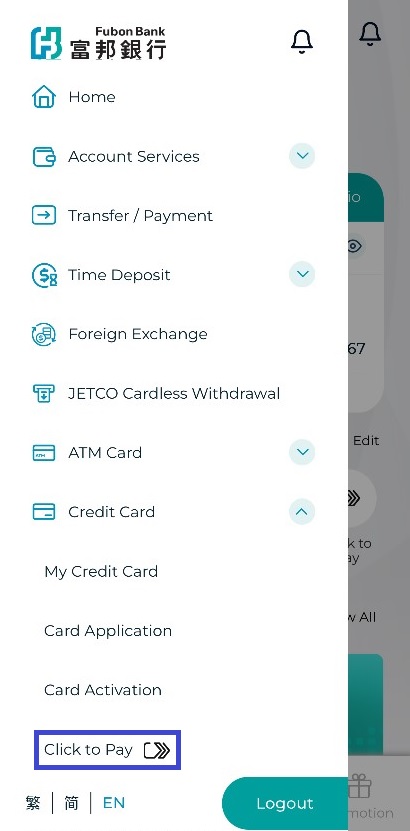
Log in Fubon+, select “Credit Card” from the sidebar menu, then select “Click to Pay”
Step 2:
If a credit card has not been registered for “Click to Pay”, it will be labeled as “Register Now”. Select the credit card to register in “Click to Pay”
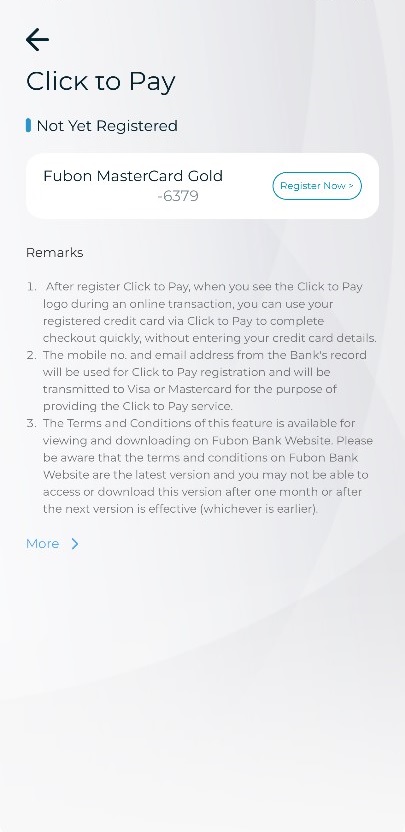
If a credit card has not been registered for “Click to Pay”, it will be labeled as “Register Now”. Select the credit card to register in “Click to Pay”
Step 3:
Read and agree the Terms and Conditions and click “Confirm”
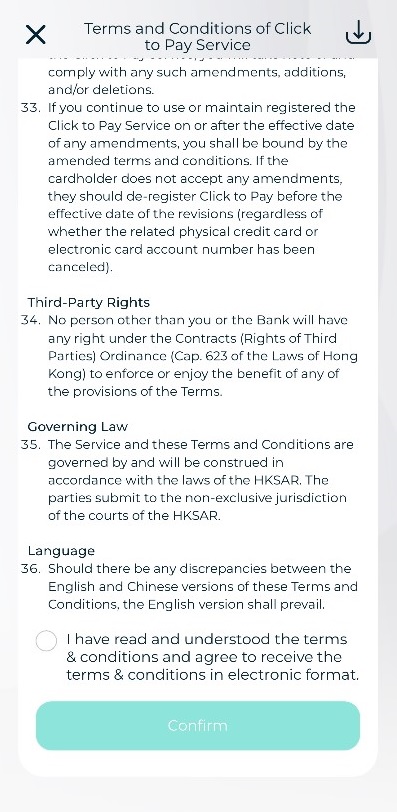
Read and agree the Terms and Conditions and click “Confirm”
Step 4:
Enter the “Mobile Security Key PIN” and click “Confirm”
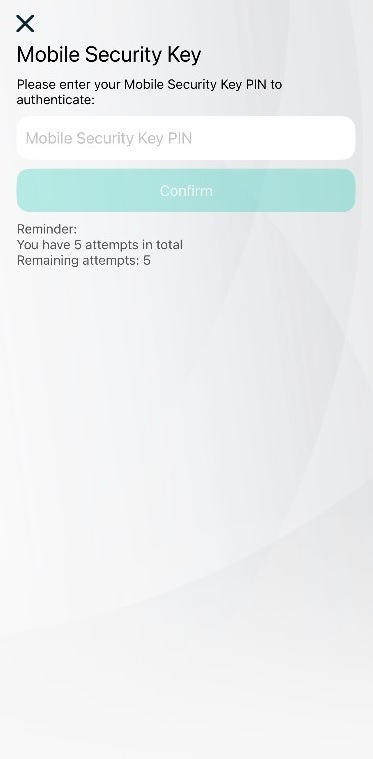
Enter the “Mobile Security Key PIN” and click “Confirm”
Step 5:
Confirm the credit card number, mobile number, and email address shown (as per the Bank’s records), then click “Confirm”
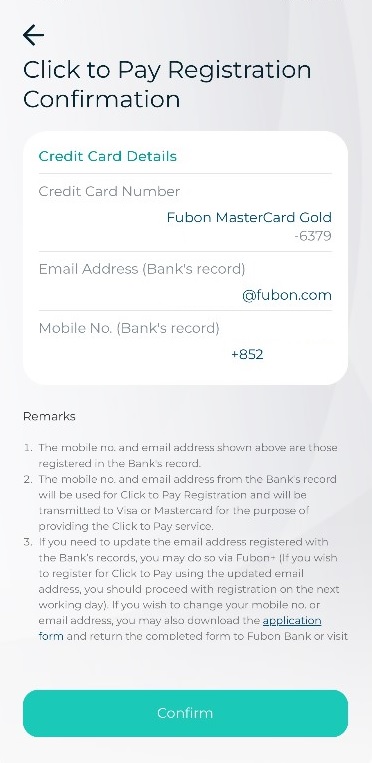
Confirm the credit card number, mobile number, and email address shown (as per the Bank’s records), then click “Confirm”
Step 6:
Successful registration of “Click to Pay”
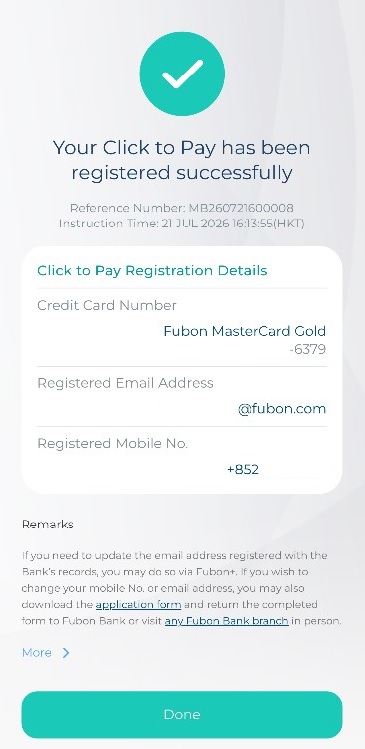
Successful registration of “Click to Pay”
Step 7:
The registered “Click to Pay” credit card will be labelled as “Registered”
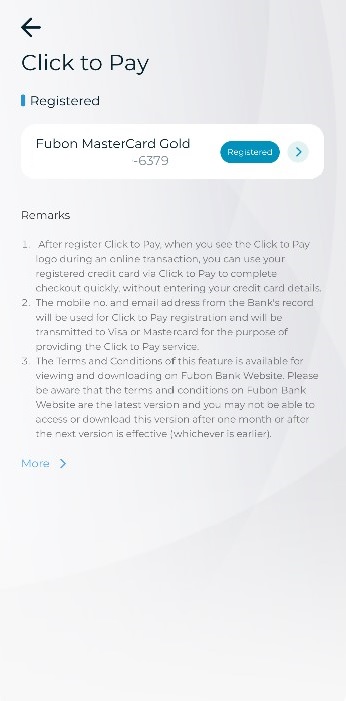
The registered “Click to Pay” credit card will be labelled as “Registered”
Payment
PaymentPlease refer to the card associate website for instructions on merchant site transactions.
Deregistration
Deregistration
Step 1:
Log in Fubon+, select “Credit Card” from the sidebar menu, then select “Click to Pay”
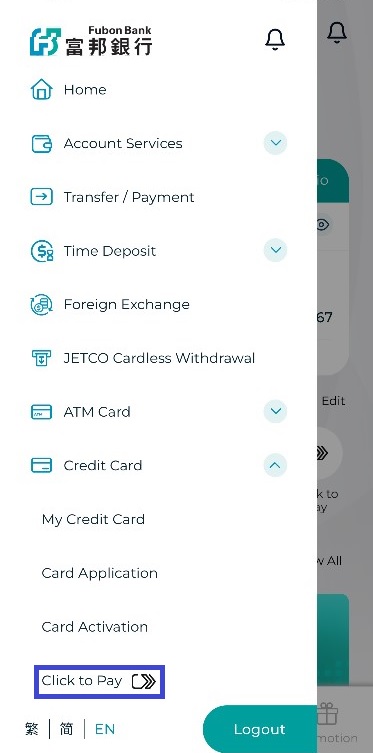
Log in Fubon+, select “Credit Card” from the sidebar menu, then select “Click to Pay”
Step 2:
Select the credit card to deregister from “Click to Pay”, then click the blue “>” icon next to “Registered”
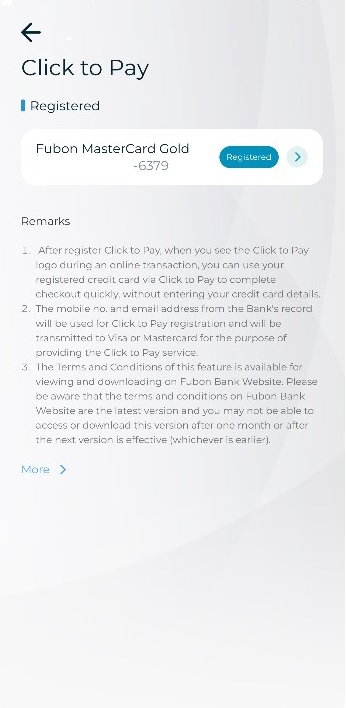
Select the credit card to deregister from “Click to Pay”, then click the blue “>” icon next to “Registered”
Step 3:
Confirm the credit card number, mobile number, and email address, then click “Deregister”
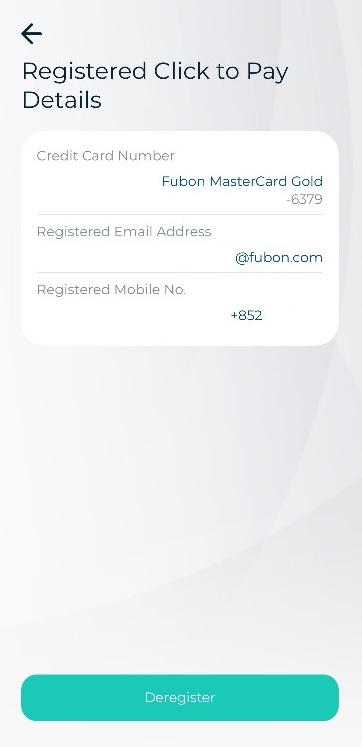
Confirm the credit card number, mobile number, and email address, then click “Deregister”
Step 4:
Click “Confirm” to confirm the deregistration
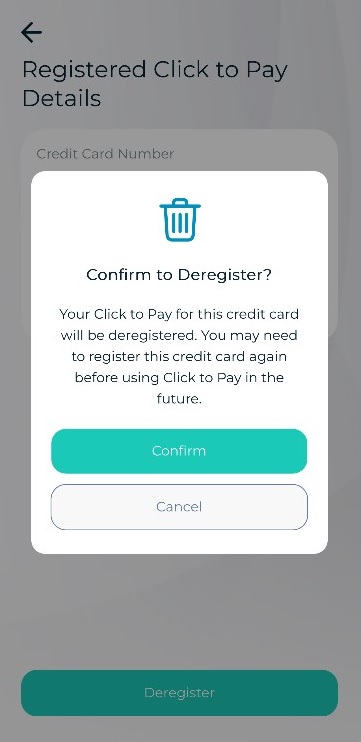
Click “Confirm” to confirm the deregistration
Step 5:
Successful deregistration of “Click to Pay”
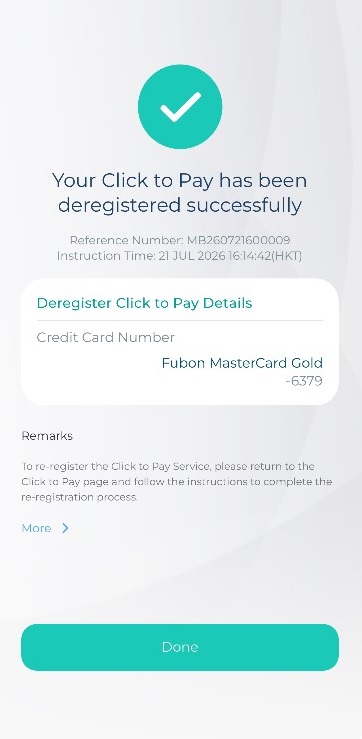
Successful deregistration of “Click to Pay”
Register your Credit Card to Click to Pay now
Register your Credit Card to Click to Pay now Download「Fubon+ HK」

All photos are for reference only. Apple, Apple Pay and the Apple logo are registered trademarks of Apple Inc. in the United States and other countries. App Store is a service mark of Apple Inc.
All photos are for reference only. Google Pay and the Google Play logo are registered trademarks of Google Inc. Google Play is a service mark of Google Inc.
Click to Pay
icon is a trademark owned by and used with permission of EMVCo, LLC. For Click to Pay service terms and conditions, please click here.
For more information on Click to Pay service, please click here to visit the Visa website or click here to visit the Mastercard website.
Don’t have a Fubon Credit Card yet? Click here to apply!
To borrow or not to borrow? Borrow only if you can repay!
Important Message | Fubon Mobile Apps Security Tips | Careers | Rates Enquiry | Calculator | Service Charges | Key Facts Statement | Authorisation Arrangement Guide | Investor Relations | Regulatory Disclosures | Relating to the Personal Data (Privacy) Ordinance and Consumer Credit Data | Privacy Policy Statement | Privacy Impact Assessment | Global Terms and Conditions for Accounts and Services | Customer Due Diligence (CDD) Information | Anti-Bribery and Corruption Statement | Requirement for declaring excessive TWD (Chinese version only) | Common Reporting Standard | Code of Conduct and Practice | Understanding Dormant Accounts & Deceased Accounts | Web Accessibility Statement | Whistle Blowing
Member of Fubon Financial Holding Co., Ltd.
© Fubon Bank (Hong Kong) Limited . All Rights Reserved.